Another note: PLA has gotten significantly better in the past few years. PLA+ is legitimately better while being as easy to print and the Polymaker HT-PLA and HT-PLA-GF are even better as you can meaningfully anneal them after printing to make them strong and temperature resistant enough for some very functional prints.
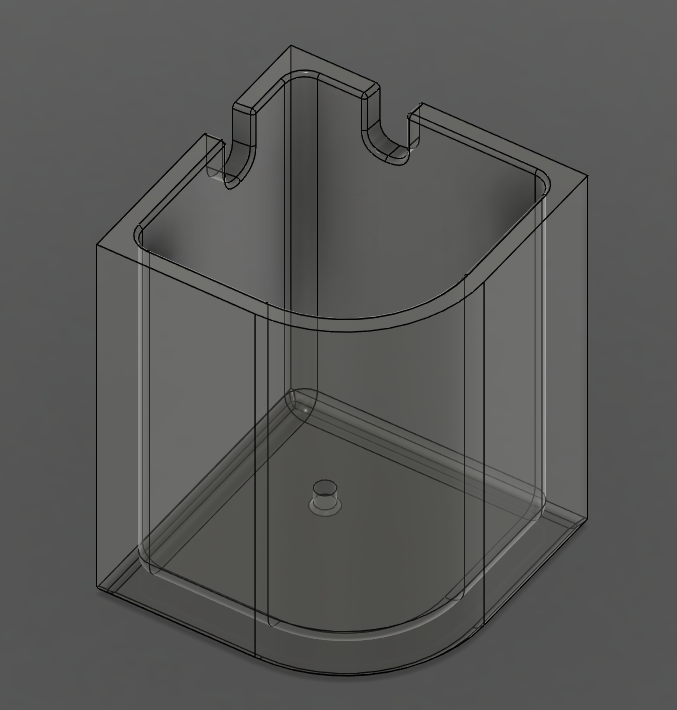
In the garage, I have one that I can slap down anywhere, with a couple boxes that I can load for the screws, nails, washers, nuts, and bolts, etc... used in my current project.
Having the grid makes the boxes sit firmly in place.
Also due to lower nozzle and bed temperatures, prints start faster so you can check the first layer sooner before you let the printer do its thing.
For functional parts I would not use anything else until there is a really good reason (such as high temperature stability or more strength for a given weight or cross section). I've gone through multiple tons of the stuff now (3500 Kg in total or so) on 85 printers (Bambu's (43), Creality (22) K1s and Prusas (20)), consistency between batches is very good though from brand to brand there can be some notable differences.
If you have stringing and globbing problems with PETG my first guess would be that the filament profile that you are using is subtly off for that particular brand of PETG and/or that the filament wasn't dry.
PETG is just oozier and stickier by default, so stringiness is almost guaranteed to happen, bridging at a greater risk of failure, etc. It is tougher, so unless you have a printer that can use multiple filaments on the same print, removing supports is more difficult.
Can you reduce these factors by tuning your 3D printer - yes, a bit. But that's not "utterly problem free".
PLA is the plug and play of the 3D printing world right now.
Incidentally, a lot of the stuff on thingiverse and other similar sites suffers from those kind of issues. They are tuned for PLA on a particular printer without realizing it.
I personally run all PETG because it is ultimately better material post-print, and once you understand how to print with it, it’s not really much harder to deal with.
The day I discovered that I should just run my dryer with the PETG inside while printing was revolutionary. Of course, that requires you own a dryer that allows the filament to print while it’s inside.
I can print PLA at 100mm/s with .25mm layers...but PETG I don't go much over 65mm/s give the same line width/layer height.
Since getting things dialed in I switched to primarily printing PETG. Although, I have no issue printing PLA, PETG or ABS when needed.
I am getting reasonably consistent prints but they aren't perfect.
The long version of my tips for using PETG are:
- A Bambu Lab printer doesn't hurt since it's so nicely calibrated and idiot-proof
- Clean the build plate with dish soap and dry fully. I haven't found any need for glue stick on a textured plate.
- Using a filament that has a profile available from the manufacturer for Bambu lab printers
- Printing with the filament in the dryer with the dryer running during printing
One thing I've started playing with now are gridfinity cases so I can pick a bunch of part boxes out of my drawers, put them in the case and take them to the garage without risk of everything falling out. Then, when I'm done, they go back in the drawer.
If you have never designed physical objects before it is really challenging at first. The learning curve is pretty steep and, at least in my case, I discovered that I didn't have a mental language for thinking about functional 3D and mechanical design. You also start to look more closely at the objects around you and think about what went into designing them.
I started doing 3D design about a decade ago, when I got my first 3D printer. At first using free modeling in CAD and then later learning how to do constraint based and parametric designs in Fusion 360. This felt slow and perhaps limiting at first, but when you get used to it, it will save you a lot of time later and allow you to make more useful designs that are much easier to evolve and vary.
I think it took something like 4-5 years before I printed something someone else had designed. Mostly because I used 3D printing to make custom parts for my own projects, but also in an effort to force myself to learn. I know the learning curve was steep, but for some reason I have forgotten how much work it was to learn.
Now there are so many useful designs, designed by people who are a lot better than me available everywhere that I do print a lot of things others have designed. But I think learning to design things yourself is a really good opportunity to learn useful skills.
For instance, I had never anticipated that I, a software engineer, would get paid, by an actual customer, to design parts for their projects. Or even consult on physical design for someone doing product development. I am by no means at the level where I'd put it front and center on a resume, but I can design, and to some degree, manufacture simple mechanical parts.
(Along with 3D printing I've been doing some CNC at a very hobbyist level. I would still say I am very much a beginner when it comes to machining metals, but it is really fun to see that you can make reasonably precise metal parts for real applications (car parts) at home in my garage with not that much effort. This weekend I'll be doing thread milling in aluminum for the first time on a part that requires M3 screws)
Last year I printed a peg leg for a nonstandard luggage wheel that broke off my suitcase and Samsonite won't sent a replacement for, a cleanable coil denitrifier for a saltwater aquarium, custom shadowbox drawer organizers for a toolbox, and during an aquarium emergency printed a metric to US pipe bushing.
I also put the skills to use for woodworking modeling a set of couch doggie stairs and a couple years ago designing the building for my observatory.
It's a really really useful skill
Deltahedra has extremely impressive tutorials on YouTube. No fluff -- no long intros or filler -- 30-60 minutes of dense content, clearly explained: https://www.youtube.com/@deltahedra3D
But a heck of a lot of what I print doesn't exist, or only exists in disparate parts. So I am forced to RAD a lot of stuff together.
I can express myself well spatially in code, but that doesn't help much in CAD where you have to figure out what combination of buttons and parameters will do what I want.
I can manage dependencies well in code, but that doesn't help much in CAD. I continually struggle to design parts with geometry that is dependent on the spatial relationships and constraints of how multiple parts connect together.
has allowed me to extend it to do things which would be quite difficult in other tools:
It's a really good feeling to be able to put something together that solves your problem. As I asked my wife, "Is this why people with wood shops are always so smug?"
It's also fun to be able to feel your skills building. I now have opinions on friction fit box lids.
Blender is overwhelming at first glance, but it becomes incredibly intuitive once the UI clicks. Of course modelling for printing in Blender has drawbacks and limitations. It's more fiddly, but unless you are super stupid, you can get pretty far, pretty quickly. And you can do sculpting and organic shapes, which are hard/impossible in CAD. Learning Blender basics is worth it anyway, incredibly useful for thinking and sketching in 3D. Oh, and it's FOSS, runs entirely locally, doesn't spy on you, or appropriates your creations like the "free" Fusion360 and their forced cloud crap.
Once you got annoyed by Blender's limitations for 3D printing, you can learn CAD. But Blender is the best way to get into it IMO. Trust me, you won't regret learning Blender basics, in any case. It's expanding your creative horizon and is fantastic, very pleasant software.
The donut tutorial is ... handwavy relevant to 3D printing.
3D modelling for 3D printing doesn't require materials, colours, lighting, camera placement etc etc. But doing the donut tutorial will get you used to many aspects of blender and realise just how powerful this software is. It's also kind of a Blender right-of-passage.
The Blender documentation for beginner video series is honestly really good too. Goes through the concepts of the interface directly in short bite sized videos. Annoyingly, I can't find them on blender.org because I've been cloudflare blocked...
And Blender has a large body of community forums for questions and answers if you want to search(first), post a question, or likely ask your friendly AI what the answer is.
It can be composted in industrial composters, but even if you dont do that it's still pretty green
It can be multiple hours between prints because good prints take time. But you can spend 30 minutes browsing random peoples designs online and say "cool" and press download on 20 different designs that you only print 1 or 2 of ultimately.
Also some designs look cool but the second you load your model up in a slicer you can see it is too finnicky or too long or expensive to print to be worth the effort.
Let's see how much you really care: https://all3dp.com/2/best-diy-filament-extruder-kit-maker/
Am I really the only one?
Being able to design, print, test, change, print again really made the potential of 3D printing shine for me. I must have went through a couple dozen iterations as the hardware choices solidified and I saw what worked and what didn't (like "oh, I actually can't reach that screw once these two pieces are put together"). It was a really rewarding experience and I'm looking forward to the next project.
https://github.com/Brookke/brookke.github.io/blob/main/src/c...
These are the types of things I want to print. My Ender 3 was so finicky, I only got a few out before I gave up.
The kind of problems that could only be solved with a rather embarrasing amount of tuning every time I switched filament types or speeds or the temperature in my garage changed etc etc etc. Things that basically meant that every time I wanted to introduce any change I needed to print a new flow tower, new bridging tower, new temperature tower, the bed levelling took a huge amount of effort to install BL touch on it but it still worked....when it wanted to, with parts of the first layer being too close scraping the bed and others being far enough to not stick.
Don't get me wrong - the Ender 5 could print as well as the H2D can, absolutely. But it would need 10 test prints and me pulling my hair out first to get to the same level of quality - which I have done, repeatedly, but I just lost the appetite for the tinkering. With the H2D I click print and the machine calibrates itself so well I actually feel bad for anyone who only ever experienced this and never had to sit down calibrating extruder steps or flow rates manually. (yes, old man yelling at clouds).
>>and I don't send a single bit of information to the Creality mothership while doing so. The same is probably harder - but maybe not impossible, I haven't looked into this yet - with Bambu printers?
Bambu printers, even with the most recent firmware allow Home Assist integration where you can monitor all print parameters remotely. But to be completely honest with you - I did go through a phase where I cared about stuff like this, now I just want it to work and be more like my dishwasher than like my bike, I want to tinker with the bike but my 3D printer should "just" work.
As their post makes clear (even to me) there are actually a lot of things out there you can 3D print. Something I printed last year (and did not even bother to post) was a center-console "compartment" for a 1995 Mazda Miata I have. I swapped out the trashy aftermarket stereo (a previous owner has installed in the Miata) for one that is close to OEM but then I had an empty "hole" in the center console. So I printed a cubby for it.
I too was like the author. Originally got into 3D printing years ago—found it frustrating. Picking up a Bambu printer a yearish ago made made all the difference in the world for me. Previously I had an Ender and it was, endlessly frustrating (pun intended). The Bambu is so next-level, the software so well integrated and polished, that I finally found that I enjoy, and I am not burdened by, 3D printing.
(The only caveat about the Bambu is that people worry about vendor lock-in. I don't believe Bambu have enshittified that way yet, and people are finding workarounds in case they do, albeit by adding complexity in setting up, printing. The price of the Bambu for someone getting into 3D printing is very attractive.)
[1] https://engineersneedart.com/blog/3dprinting2025/3dprinting2...
Knowing you can design a simple part in a few minutes and actually print it immediately afterwards is important. Before I got a reliable printer (bambulab a1) i put off even the smallest projects because I knew it would entail a multi-hour trial and error session with the printer.
Prusament PC Blend is insanely strong and stiff, I saw a 3mm PC bracket bending a high quality metal wood screw into an S-shape without breaking. PC-CF is much easier to print, looks great, and is stiffer still, even if a bit less strong. ASA looks great and is tougher than PC. Both creep less than PLA and PETG. Both shrug off 100C under load.