https://www.justinmklam.com/posts/2026/02/beginners-guide-sp...
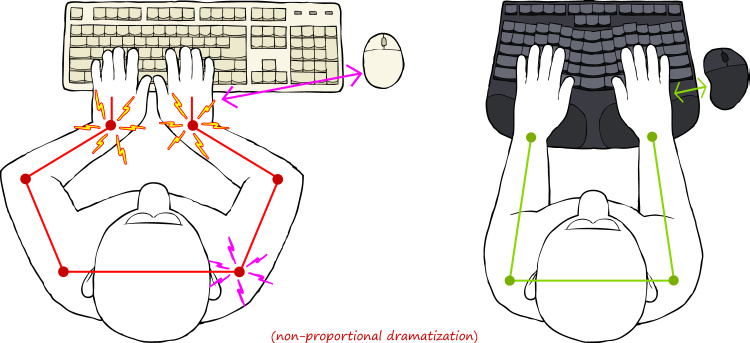
I don't know if it's just me, but I don't use the keyboard like that. I know the illustration is said to be exaggerated, but still. There is no need to squeeze your hands in front of the keyboard. Just naturally bring your hands in front of chest, the same as when you are reading a book or writing notes with a pen. No twisted wrists. No ulnar deviation. The idea that you can't do something with your hand in front of the center of your chest without hurting the wrists seem like a strange supposition.
Admittedly, I've never looked at a significant number of people typing on a non-split keyboard, so I don't have the data to refute the need of this invention. I just feel like the natural posture already doesn't have the problem of ulnar deviation.
Homerow centric posture is imho the main cause of keyboard related pain.
Our bodies love movement and it's often a recipe for solving all sorts of issues.
The "numeric keypad" hazard also illustrates why I was motivated to switch my Sun mouse to the left-hand side, and I reversed the buttons in my X11 mappings. This was a reliable way to perplex my coworkers.
It's split in two so you can position them at shoulder width. It's angled so your wrists are in more natural positioning (reduced pronation), and curved to prevent finger overstretching (finger joints have arc-shaped range of motion). It's injection molded and hot-swappable.
I've been working on this since 2022 and am getting close to launch. It's gotten very good feedback from beta testers.
This allows the hands to do more with the keyboard while resting the hands on home row. -- For users comfortable adding a bit of complexity for the benefit of increased expressiveness (e.g. vim users), having extra thumb keys allows bringing the full functionality of the keyboard to within reach of the hands on home row.
For me, I think that these keyboards fix many silly design flaws of the traditional keyboard makes them interesting enough to be worth using.
Mine are tab, esc, space, backspace... plus layer shenanigans (https://configure.zsa.io/planck-ez/layouts/jDnba/latest/0)
Left hand: control, meta, command, hyper, super, backspace
Right hand: space, enter, command, hyper, super, del
Russian, for example, has 33 letters.
So if you’re someone like that, you really want that ordinary macbook-like number of keys = larger non-symmetrical right half.
—
As for the ortholinear keyboards, I spent a few months with the latest kinesis but sold it eventually: not that comfortable.
Just clench your fist and you will see that not all your fingers are moving in straight parallel lines. I don’t buy the ortho logic at all. I would argue that left half of the ordinary keyboard is even more ergonomic in this sense.
—
Also don’t bother with dvorak, qwerty is 80/20 pareto stuff. Just isn’t worth it compared to returns.
—
Tdlr; split, traditional layout https://uhk.io/ is my best purchase: use it for almost 5(?) years. Modded it for swappable switches, lubed, what have you.
Don’t waste money for uhk riser, not worth it. Small plastic built-in legs are more than enough.
Wooden palm rest is a must though.
—
Previously was a big fan of microsoft split ergonomics (2nd gen and sculpt later)
—
BTW if you use multiple OS, map the ctrl key on windows/linux to the same place where command is on mac. Shortcuts will be the same physical keys, also it is much more comfortable to have this pressed with a thumb instead of a pinky.
Though you would want to buy a rounded key cap (like a spacebar) of you use a mechanical keyboard — it is painful to press the keycap corner with a thumb if it is not rounded.
I wouldn't specifically recommend other people learn Dvorak, but I switched to it when I was in my early teens (~25 years ago) and I feel pretty great about the returns I got from that.
My kid sure isn't getting qwerty as their default keyboard.
I also swap ctrl+caps. That caps key real estate is just too good.
It's pretty wild, I can _ONLY_ touch type dvorak. I couldn't tell you which keys are which looking down at the keyboard. And I'm fast. I'm so fast I don't even need to vibecode.
Also It's nice to have a 10-key at home row (5 goes with k).
It's not so much about speed, as about comfort.
Some people claim that they went from 60 WPM on Qwerty to over 100 WPM on some other newly designed layout, but my experience is clear: if you do it for the speed you will be disappointed.
> Russian, for example, has 33 letters.
Ironically, the biggest enthusiast of these splits I know in real life (he owns a kinesis) is a slavic guy, speaks both Ukranian and Russian, but I suppose he's typing in English for most of the day at his job, however I know he uses layering for the cyrillic.
You can get used to it, but why suffer. Especially if one also uses a laptop.
Other thing that I don’t like in all these small custom keyboards is that most rely on a single spacebar on one half. I learned to use either thumb depending on which next key is: press space with left thumb if next key is on the right half and vice-versa.
—
Also I would urge you to buy a keyboard with arrows keys and extra stuff like home/end
I use uhk 40 and it is fine most of the time since I use vim-motions in my IDEs. But sometimes I just wish they were there.
For example alt-right on mac is to expand all folders recursively in the Finders list view. Just becomes an effing piano if you need to add caps-l to have an arrow in addition to all the alts and shifts.
You can mitigate this with stuff like caps + ; for alt + right arrow (ctrl + right arrow for win), but again, when you need to add shift or not only left/right it gets cumbersome once you are not in the vim-like environment (chats, word, what have you).
tldr; buy uhk 80 nowadays. And an external bluetooth numpad for those days when you need to enter a lot of numbers. Why external? Shorter distance between a keyboard and a mouse — more comfortable and takes less space.
Or learn to mouse with your left hand. ;)
I used an MS ergo keyboard at my office for years with left-handed mousing since that puts the keys in the middle, mouse on the left and numpad on the right.
Even french and german need layers (shift or right alt) for all the stuff like ß or adding accents like é è ê ë
Every time I used wireless keyboards (microsoft sculpt, latest kinesis advantage), I had issues from time to time.
Come to think of it, only apple magic keyboard never failed me. Though I don’t have many hours with it.
Irritatingly, this doesn't work by default on the mac where the meta keys only affect the keys on the keyboard owning the depressed key (IE left shift and right keyboard l will not result in L).
It uses a bit more desk space, but is otherwise a pretty good way to test out "do I want a split keyboard?"
It's an interesting hack, though.
Main reason for my switch is that I felt that my shoulders have a wider stance than before. I don't know if it's because of an improvement in fitness (I do a lot of shoulder and back work), or maybe with age I lost a bit of shoulder internal rotation mobility.
Either way, the learning curve was like a few minutes for me. Guess it's a perk of experience and the habit of touch typing.
It has too many keys in thumb clusters and bottom row, but you can easily remove them.
That said I used to use a lily58 and for me it was great. I have a lot of papers, notes and books on my desk. A small easily movable keyboard meant that i could have something between the keyboard halves, writing and reading without issue
I had initially thought that it'd be hard to use both kinds of keyboards at once, but my muscle memory for either seems unaffected when I use the other one.
The thing I thought was ergonomic BS was the benefits of columnar/ortho layouts; everyone talked about how your fingers just moved vertically and it was so much better for them, and I rolled my eyes. But dang if it hasn't proved to be meaningfully true for me, too -- when I have to type on a legacy keyboard, I can clearly feel the pain in my fingers. (The disclaimer here is that my fingers are totally screwed up; if you don't feel pain normally, this probably matters less.)
When I switched to a split keyboard 20 years ago, I realized that I used my right hand to type T and B. But it was a pretty quick transition when I kept slamming my index finger into the gap!
There are a lot of keyboards I'd like to try, but I'm pretty happy with these.
I tried multiple split keyboards over the period of 2 years and never grew out of these habits. I always wished, at the least, that some of the middle keys were duplicated between the two halves.
Eventually I received some permission to accept my personal "kinetic signature" (so to speak). Then the chronic wrist pain that led me to try split keyboards in the first place vanished. So I went back to using a normal tenkeyless. This led me to believe that split keyboards were ideal for some people, but that other people (like myself) are predisposed to a sort of perfectionism that entails physical guarding and chronic pain.
I still wish I had a wireless split keyboard for times when I'm supine and need to type, though.
The elephant in the room with the 'ergonomics' argument for split keyboards is that you get a marginal improvement using the keyboard this way and ten times the effect by just getting up and going for a five minute walk every hour or so.
The same goes for mousephobia, which overlaps with split layout users. I still use neovim every day, but the quickest cure for the CTS symptoms that 'ergonomic' keyboard purist vim users seem to get much more than their IDE coworkers is just moving your hand to do something other than type in the exact same position for hours on end - something like grabbing a mouse. I strongly suspect that CTS in software engineers will go down in the next coming years as coding agents become more common and SWEs pick their hands up more (or just physically type less).
The same goes for back pain, if you're otherwise ablebodied enough to start resistance training it's infinitely more beneficial than whatever chair you're looking at.
Kinesis Advantage keyboards have been popular for decades and proven ergonomic benefit - mainly because the cup avoids wrist movement and the high-traffic keys are moved to the stronger thumb. Some users prefer the newer split Professional to avoid constraining arm position. These keyboards stopped my RSI cycle decades ago, and improved my speed by roughly half. (Also a US company, with fantastic support.)
Any suggestions of simple split mechanical keyboards with standard (row staggered) layouts that aren't a small fortune?
Anyway, after trying a couple of things, Microsoft Natural (the original with backtilt) saved my programming career. I still have "weak" wrists/fingers/forearms, but it's rarely painful enough for me to have to stop working. Adding in some stretches generally makes it so I can survive.
I can type on a normal keyboard for maybe 15 minutes and maybe an hour on a laptop before I just can't anymore. I can generally go most of the day on my Microsoft Natural. Retraining from a regular keyboard layout (took typing in high school - yes, I'm ancient) wasn't hard at all - it's basically the same.
Sure, it's technically not a "split" keyboard - it's still one thing. These days, I buy used examples off ebay, usually 3 at a time, and on some, the typing action is horrible - but I still have a couple of examples that are usable. And I had to find the right ps2->usb adapters for my work setup. If I ever totally run out, my professional coding days are probably done.
They might be a smidgeon further apart than might be ideal, there’s some ugly duplication… which happens to enforce a minimum distance… just get that shoulder opened up and start evaluating. It’s certainly likely to be more optimal than the status quo.
Might need Karabiner on macOS to keep shortcuts working.
Logitech's ergo k860 is affordable, has a palm rest (most mechanical keebs don't), and has an excellent ergonomical shape. And works right out of the box, with Bluetooth enabled.
The keys are membrane-based, which some may dislike because they are not mechanical - but it's actually more ergonomic, as they require much less pressure and travel length to achieve an input, meaning less wear on your fingers.
About travel distance, this is also something you can adjust, with the low profile switches having less than 3mm travel distance.
Heck, even HE keyboards can set their actuation down to 0.1mm, if that's your thing.
Had you asked me how often I use those keys, I would have said hardly ever. Now that I have to suffer that layout, I have realized they are crucial for my typing/usage patterns.
The F-lock nonsense isn't too awful, you get all of the keys, the layout is pretty standard, you can buy ANSI layout ones in the UK, and there's a full set of meta keys that are usefully symmetrical enough. Also: connects to PC with a wire. No batteries required. (The wonders of modern technology!)
Haven't tried the brown switches.
The red switches are quite light touch with a nice positive action. Very nice to type on for text, where my fingers can get into a good rhythm, but it's a bit too easy to hit the wrong key if I'm going for an arbitrary keyboard shortcut.
The blue switches go click, which feels great to type on, and I've found it does help a bit with the problem of hitting the wrong key (something about the more obvious multimodal feedback gets my subconscious on the job I suppose) - but I never quite got on with the slightly heavier key action.
I used to use the MS Ergo 4000, and I've found this a good replacement. The keyboard layout is very similar, as is the reverse tilt angle, and the palm rest is fine, even if it's IMO inferior to the MS 4000. (But: the MS 4000's reverse tilt stand, a single piece of solid plastic, is significantly more solid than the Perixx's little fold out things. Worth bearing in mind if you're in the habit of resting your elbows on the palm rest when in thought.)
Official name now : Incase Designed By Microsoft Sculpt Ergonomic Wireless TKL Keyboard
https://www.incase.com/products/sculpt-ergonomic-keyboard
(In Canada, only available at Bestbuy)
I switched to Dvorak at the same time that I switched from row staggered keyboards (so five years ago), and I must say, if you're thinking about switching layouts like that, there is no better time than when switching to a wildly different keyboard. My Dvorak muscle memory is entirely tied to typing on a split, columnar keyboard, and my QWERTY muscle memory is entirely tied to row staggered keyboards. I have never used Dvorak on a row staggered keyboard, and I have never used QWERTY on my Moonlander or Voyager. I think that's helped with maintaining my ability to use standard QWERTY keyboards after not using them regularly for years.
It seems to have this issue (or maybe Macbooks do? I don't know..) where, waking my computer from sleep, the right side of the keyboard doesn't work. It's quickly fixed by unplugging and replugging the right side of the keyboard into the left, or unplugging and replugging the entire keyboard into the computer.. it's a shame that I have to do that sometimes, though.
I'm probably going to end up building a custom board with the features I want (gentle curve, ISO layout, nice switches) since what I want doesn't seem to be available off-the-peg. (The X-Bows keyboards are quite nice, but ANSI-only - I've done enough programming to have learned that I'm not prepared to compromise on the position of "\"!)
I've had steroid injections into the tendon sheaths of my fingers a couple of times, which hurts like a bugger when it's done but definitely improves things after a few days. It isn't a cure, though, and my hand doctor thinks I'm going to need surgery eventually.
I have to assume that a split keyboard won't help this. Is there anything that might, short of a voice interface?
As for the tendinitis, have you tried physical therapy for your fingers? Whenever I've had a stupid day of overusing the thumb with my phone, I wrap the smallest possible elastic band around my thumb, and do some curls. Slow and controlled. The mixture of force, movement and stretching feels great, and the issue is gone.
Here is an example band https://www.decathlon.es/es/p/banda-elastica-5-kg-cross-trai... the important part is that it's really thin and light. It should look like a string, not a flat band.
There are some styles of "chording" keyboards that might help too, and some that would be way worse. Chording keyboard are also wildly different to regular keyboards, totally alien by comparison to just splitting a keyboard.
Here's an example of what that might look like: https://kinesis-ergo.com/wp-content/uploads/KB360-GBR_FRONT-... (though in the default configuration, shift is still on your pinky; you can customize this on most keyboards, or on OS level).
The rabbit hole goes very deep. Another option is home row mods: https://precondition.github.io/home-row-mods. A combination of thumb clusters and home row mods can reduce your finger strain a lot.
https://kinesis-ergo.com/products/#keyboards
(They used to have low-force options; perhaps all are low-force now?)
Lead times are long, and Kinesis products are expensive. It gets a little more bearable if you take into account that you're using this tool 8 hours a day for years and years, but still. Cheaper options exist.
Same principle as slow practice for music instruments.
When I gave it a look, the studies were on the side of split keyboards being the hardware equivalent of snake oil.
But whatever.
And maybe then: are keyboards the best input device in 2026?
Who cares if it's "better" if it's working better for you?
My shoulders are pretty wide for my frame. When using most laptop keyboards and many standard keyboards, I have to tuck my shoulders in and twist my wrists. This was causing some serious pain and tension in my neck, shoulders, and wrists, likely leading toward carpal tunnel.
I made two different changes in succession that helped greatly (and I don't remember the order now):
1. With a split keyboard, the halves could be placed so my wrists are straight and my arms hold at shoulder-width, and this rapidly reduced the amount of tension I was experiencing and gradually eased my wrist issues. Tenting the keyboard and getting a vertical mouse helped as well, but I'd rate those as minor improvements, especially since I aim not to drive with the mouse as much.
2. With Colemak layout, I was able to gradually transition from QWERTY (there's a series of AHK scripts I found at the time that basically rotated triples of keys). This helped reduce wrist strain at the hand level.
I was once amused by a friend that had never seen a split keyboard before - they were mostly delighted with having a place to put their coffee...
Anyway, the fact alone that you have less bend in the joints of your hands, if used right, seems to avoid all sorts of carpal-tunnel syndrome?
I have found that my Ergodox allows me to juggle my keyboard halves around the desk at different angles and spaced apart at different widths, and I can put my trackball either to the right of everything or between the halves. It's a single anecdote, obviously, but I have been able to make my ulnar and carpal entrapment issues mostly go away by finding better positions while working and by not staying stuck in one posture or position for too long at a time.
But I'm not sitting like a robot in front of it. My office chair is set to sviveling back, which I often do. I'm even exchanging that chair for an inflatable big rubber ball to sit on, from time to time.
Eventually I moved to a full split, positioned quite some distance apart (~25cm) and found that even more comfortable.
Always hard to know with stuff like this if you are just imagining it, but for various reasons, I'm pretty convinced it was an improvement for me.
My proper desk set up is just so much better than anything portable (not just keyboard, but also monitors, trackball, lighting, etc.) that it's not really worth doing any "real" work on the go - so while I have a number of portable devices, they're effectively just for doing stuff that can't reasonably wait until back at my desk.
(For that matter, I've effectively ditched all of my "work-capable" portable devices - my largest-screen portable devices are a Chromebook and a 13" cell-connected iPad w/ Magic Keyboard. They're both very capable devices in their own rights, but I'm not going to try to do <day job work> on them.)
I quite like it because it gives me a bit of flexibility on where I put them, and gives me a bit of extra room in the middle. Great for a small airport table or whatever, can even use them rested on your legs
https://github.com/davidphilipbarr/Sweep
https://www.amazon.com/ORICO-Waterproof-5-5x3-5x1-0inch-Acce...
In general, for my moonlander I would have the first layer with all the normal alpha numerics and a few symbols like <>?
But the second layer would contain most symbols, arranged/grouped in a manner which was natural for programming - e.g. grouping keys together like (), [], {},
A 2KH sin wave sampling at 1000 Hz reconstructs to 1000 Hz.
I did not realize this when I switched from one split keyboard to another. It’s fine, but it was a difficult adjustment.
Saw this in a YouTube video of an old tech TV program episode. It was a failed product. Maybe single-handed keyboards could come back as an inspiration for modern versions?